-
Start with safe demo data and review the month clearly.
Your personal finance records should not have to live in another cloud account.
Bayron Harbor is private offline Windows software for one person managing personal or household finances.
It is built for a quieter kind of money review: the kind you do at your desk, with time to look at the month clearly.
Start with safe demo data. Open the app, move through the main screens, and decide whether the workflow fits before entering your own records.
The dashboard brings the month into view: accounts, balances, budget progress, recent activity, and the context you need before making changes.
-
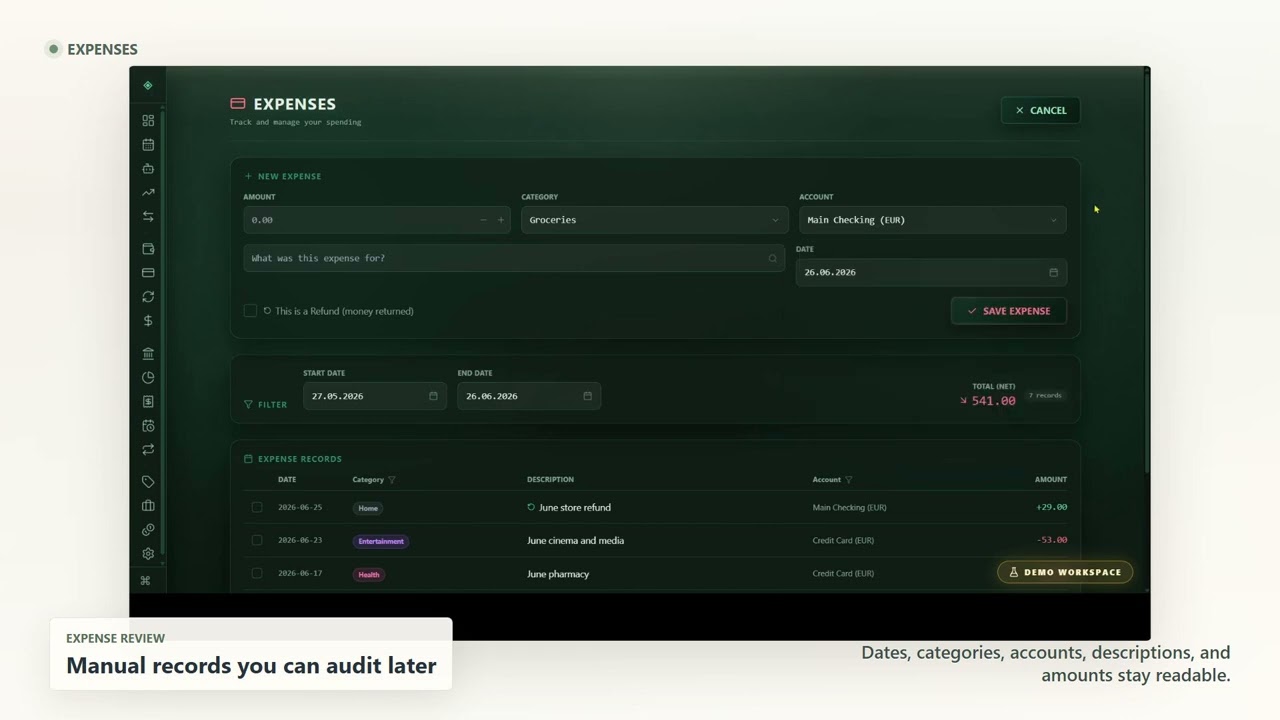
Dates, categories, accounts, descriptions, and amounts stay readable.
Expenses and income are reviewed manually, with dates, categories, accounts, descriptions, and amounts. It is deliberate, because records you can understand later are worth keeping clean today.
-
Planned income, planned expenses, and activity stay close together.
Budget planning connects those records to the month ahead. Planned income, planned expenses, and actual activity stay close together, so review does not become another spreadsheet.
-
Transfers are not treated as income or expenses.
Transfers keep account movement separate from income and expenses, which makes the financial story easier to follow when several balances are involved.
-
Reports summarize records for review without replacing judgement.
Reports summarize local data for review. They can help you see patterns, but they are not financial advice and they do not replace your judgement.
The boundary is simple: everyday finance records stay local on your Windows PC. No required bank connection. No cloud-first account. No shared team workspace.
-
Move from the demo into the Early Access path.
During Early Access, download the 30-day Windows trial. If Bayron Harbor fits your workflow, request a free personal key by email.
Product demo
Watch the Bayron Harbor demo
Bayron Harbor is private offline Windows software for one person managing personal or household finances.
Use the demo to inspect safe sample data, accounts, manual records, budgets, transfers, reports, and the Early Access trial path before entering your own records.
30-day Windows trialFree personal key by email requestNo required bank sync
Early Access
Try the Windows workflow after watching
During Early Access, download the 30-day Windows trial and request a free personal key by emailing support@makbayron.com.
What the demo covers
A short tour of the private desktop workflow
The video helps you inspect sample data, account structure, manual records, budget context, transfers, reports, and the local-first boundary before downloading.
- Safe demo data before entering personal records
- Accounts, balances, expenses, income, and transfers
- Budget planning tied to manual records
- Reports for review, not financial advice
- Early Access download path after the tour
Transcript
Read the demo without watching the video
The transcript below is available directly on this page, so you can review the product proof without loading a video player.
Honest fit
This is a local review workflow, not a cloud finance feed
Bayron Harbor fits best when privacy, deliberate records, and a desktop review habit matter more than constant automation. It is single-user software for personal or household records maintained by one person.
Not built around
- Automatic bank syncing
- Mobile-first expense tracking
- Shared family or team accounts
- Business bookkeeping or accounting workflows
Trust links
Check the details before downloading
Verify the privacy model, product-fit questions, and support route before trying the Early Access build.
Early Access
Download the trial when you are ready to test the workflow
Watch the demo, read the transcript, then try the Windows desktop app with sample data before entering your own records.
30-day Windows trialFree personal key by email requestLocal-first desktop workflow